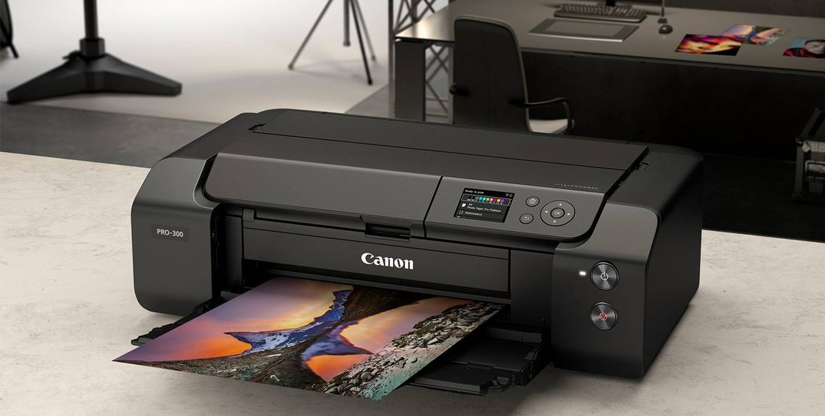
Meet the Canon imagePROGRAF PRO-300: superior A3+ photo prints, simple workflow
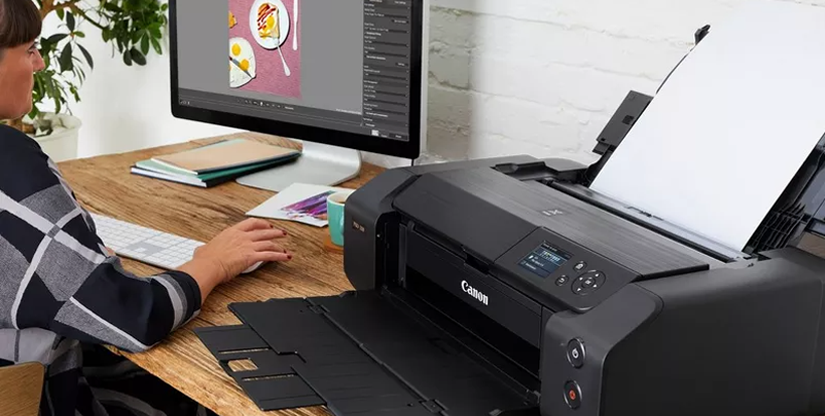
Introducing the Canon imagePROGRAF PRO-300, a pro photo printer packed with innovations and features that enable you to create your own colour-accurate and beautiful gallery-quality prints up to A3+.
With quality at its heart, the Canon imagePROGRAF PRO-300 uses Canon’s LUCIA PRO pigment-based ink technology for print permanence, rich colours including a new matte black and a wider colour gamut.
Giving you more creative options, the Canon imagePROGRAF PRO-300 can produce borderless photo prints on any media, and can print panoramic photos on cut-sheets up to 990.6mm long. It’s also compact, with a 15% decrease in volume and a smaller footprint than its predecessor, the Canon PIXMA PRO-10S.
“The Canon imagePROGRAF PRO-300 is an expansion of our imagePROGRAF PRO series, which is the pinnacle of our photo printer range, with models up to 60 inches, and we’re opening up that technology to the A3+ segment,” says Canon Europe Inkjet Specialist and printing expert Suhaib Hussain.
Automatic ink switching, less wastage
The Canon imagePROGRAF PRO-300 minimises wastage and increases productivity through technologies such as automatic ink switching. “Canon’s thermal inkjet design has dedicated nozzles per ink channel, so there’s no loss of ink from flushing and no delay when switching from glossy to matte media,” says Suhaib. “The printer switches seamlessly when changing media, thereby eliminating the possibility of wasting ink and valuable paper.”
The print head design also has built-in redundancy, which makes features like the Nozzle Misfire Detection system possible.
“Thanks to Canon’s unique print head design, imagePROGRAF PRO-300’s nozzle density is much higher than rivals, which means we have spare nozzles in our print head,” says Suhaib. “So, if a nozzle becomes clogged, whether that’s through the printer not being used for a while or actually during printing, the Canon imagePROGRAF PRO-300’s processor will know and the back-up nozzles will be fired instead, so it can keep on printing. It’s not going to mess up your prints with banding when you have deadlines to meet.”
A smooth workflow
When you’re serious about your photography, you want to take Canon quality right through your workflow from capture to print, with complete confidence that every stage will reflect the ease of use and colour integrity you expect from Canon.
Enabling you to print with confidence every time, the Canon imagePROGRAF PRO-300 has a 3-inch colour screen for easier operation, as well as paper skew correction to improve accuracy, and faster print times.
The LCD panel displays ink levels and operational messages, and can be used for performing functions such as media selection, general printer maintenance and checking network settings.
Using a series of sensors, the Canon imagePROGRAF PRO-300’s paper skew detection and correction system monitors and adjusts the alignment of paper as it feeds through the printer, reducing misfeeds and paper wastage.
“The imagePROGRAF PRO-300’s print control method reduces print times compared to the PRO-10S,” says Suhaib. “The imagePROGRAF PRO-300 will print a colour A3+ photo with a border using Canon Photo Paper Platinum Pro in under 5 minutes.”
Professional Print & Layout
As a part of the imagePROGRAF PRO series, the Canon imagePROGRAF PRO-300 ships with Canon’s enhanced Professional Print & Layout software. Available as a standalone app or as plug-in for Canon’s Digital Photo Professional (DPP) software, Adobe Photoshop and Adobe Photoshop Lightroom, Professional Print & Layout simplifies your workflow to ensure that all the necessary print, layout and colour management features are available at your fingertips to help you stay productive from input to output.
In addition, working seamlessly with Canon’s EOS camera technology to unlock unique features in Professional Print & Layout, the Canon imagePROGRAF PRO-300 enables you to achieve the highest level of print fidelity from images captured using Canon EOS cameras. Functions such as DPRAW Print and HDR Print can read the RAW image data from EOS cameras, to reproduce the sharp areas of an image accurately, as well as recover highlights from single-exposure images.
“Professional Print & Layout supports professional photo print workflows and includes features such as soft proofing, hard proofing [pattern printing], ICC profiles and image ‘nesting’,” says Suhaib. “We’re helping photographers to get what they see on their screen to match in print. It’s all about giving the user confidence.”